INFILE, DSD, DLM, and FILENAME Statements in SAS – Complete Guide for Beginners 2026
INFILE, DSD, DLM, and FILENAME Statements in SAS – Complete Guide for Beginners 2026
Introduction
The INFILE statement in SAS is one of the most important concepts in data handling. It helps SAS read external files such as text files, CSV files, tab-delimited files, and flat files. In real-time projects, most clinical, banking, finance, and healthcare datasets come from external systems, so understanding INFILE options is very important for every SAS programmer.
The INFILE statement works together with different INFILE options like DSD, DLM, FLOWOVER, MISSOVER, TRUNCOVER, STOPOVER, FIRSTOBS, and OBS to control how SAS reads data from external files. These options improve data accuracy, avoid errors, and make data importing easier.
If you are learning SAS for real-time projects, you can also explore
Clinical SAS Training in Hyderabad
For official SAS reference documentation, visit
SAS Official Documentation
In this article, we will learn
- What is the INFILE statement in SAS
- What is DSD option in SAS
- What is DLM delimiter option
- FLOWOVER vs MISSOVER vs TRUNCOVER
- FIRSTOBS and OBS options
- How to read TXT and TAB files in SAS
- Real-time examples with outputs
This guide is useful for beginners who are learning Clinical SAS Training, Base SAS Programming, and SAS Data Step concepts.
What is the INFILE Statement in SAS?
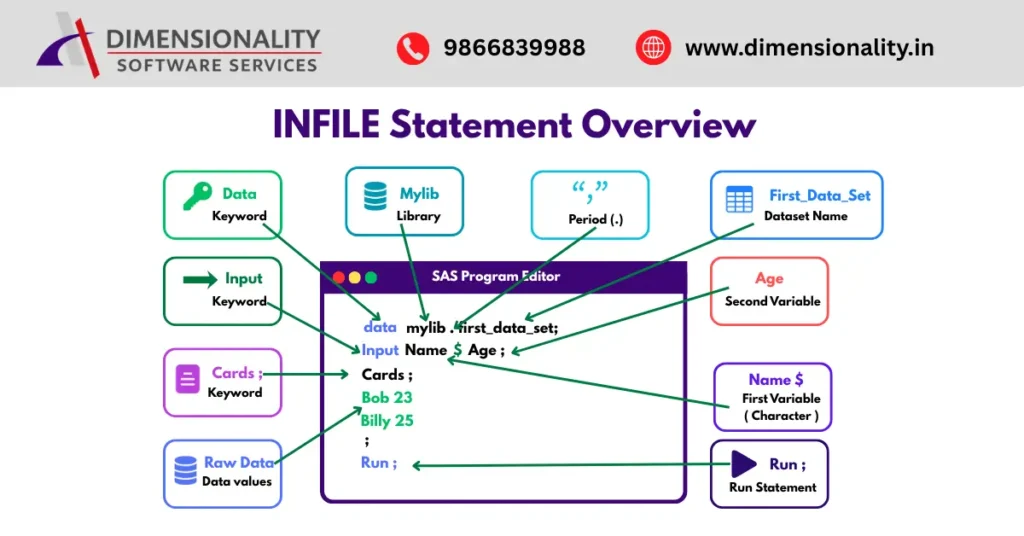
The INFILE statement is used in SAS to read data from external files such as
- Text files (.txt)
- CSV files
- Tab-delimited files
- Flat files
The INFILE statement tells SAS
- Where the file is located
- What delimiter is used
- How missing values should be handled
- How records should be read
Syntax of INFILE Statement
DATA dataset_name;
INFILE ‘file-location’;
INPUT variables;
RUN;
To understand the basics of Clinical SAS programming, read
What is The Clinical SAS Programming
DSD Option in SAS
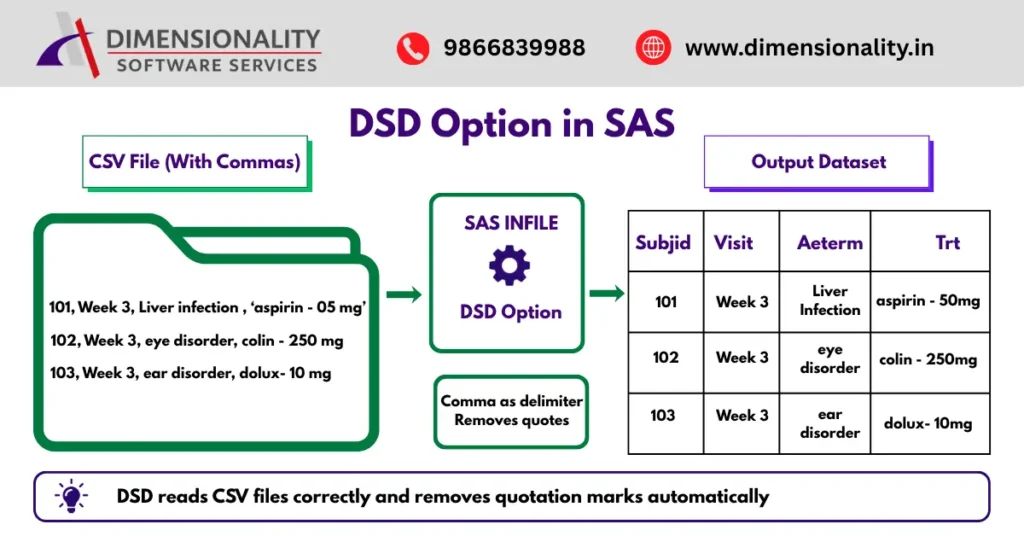
The DSD (Data Sensitive Delimiter) option is used to read comma-separated values correctly. It automatically treats comma as the delimiter and removes quotation marks from character values.
Features of DSD Option
- Treats comma as default delimiter
- Removes quotation marks
- Handles missing values properly
- Reads consecutive delimiters as missing values
Example of DSD Option
- Data Ae;
- Infile cards dsd;
- Input subjid visit $ aeterm: $20. trt: $15.;
- Cards;
- 101,week3,liver infection,aspirin-05mg
- 102,week3,eye disorder,colin-250mg
- 103,week3,ear disorder,dolux-10mg
- ;
- Run;
Output
| Subjid | Visit | Aeterm | Trt |
| 101 | week 3 | liver infection | aspirin-05mg |
| 102 | week 3 | eye disorder | colin-250mg |
| 103 | week 3 | ear disorder | dolux-10mg |
The DSD option reads the data without commas and separates the values correctly.
Students from pharmacy and life science backgrounds can also check
SAS Course for Pharmacy & Life Science Students
DLM Option in SAS
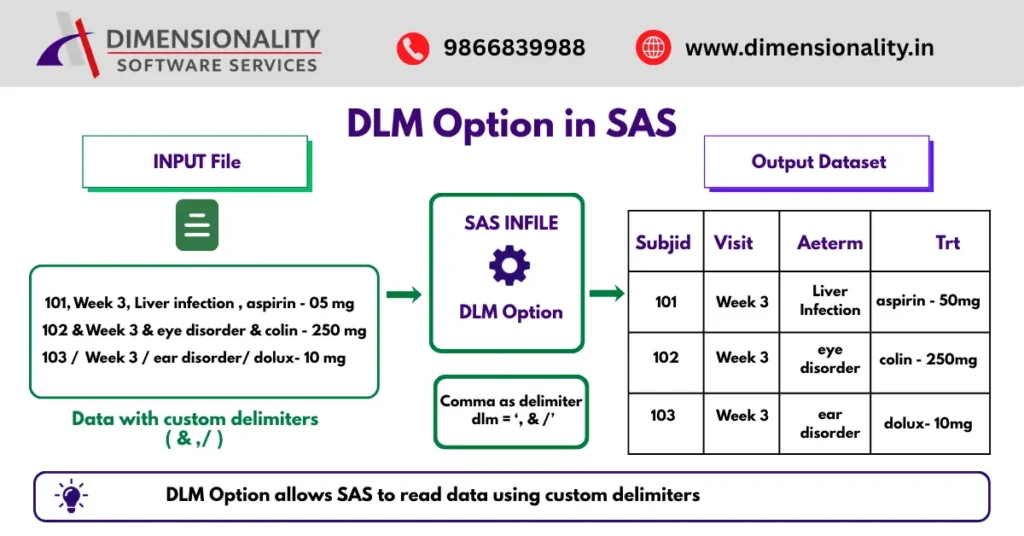
The DLM (Delimiter) option is used to specify custom delimiters in SAS datasets. Sometimes external files contain symbols like &, /, or | instead of commas.
The DLM option helps SAS identify those separators.
Syntax
INFILE cards dlm=’&’;
Example of DLM Option
- Data Ae2;
- Infile cards dlm=’,&/’;
- Input subjid visit $ aeterm: $20. trt: $15.;
- Cards;
- 101&week3&liver infection&aspirin-05mg
- 102,week3,eye disorder,colin-250mg
- 103/week3/ear disorder/dolux-10mg
- ;
- Run;
Benefits of DLM Option
- Supports multiple delimiters
- Useful for text and flat files
- Improves data reading flexibility
- Commonly used in real-time healthcare projects
DSD with Delimiter in SAS
DSD can also work together with DLM to remove quotation marks and read special delimiters properly.
Example
- Data Ae3;
- Infile cards dlm=’&’ dsd;
- Input subjid visit $ aeterm: $20. trt: $15.;
- Cards;
- 101&week3&liver infection&”aspirin-05mg”
- 102&week3&eye disorder&”colin-250mg”
- 103&week3&ear disorder&”dolux-10mg”
- ;
- Run;
Advantages
- Removes quotes automatically
- Reads special delimiters
- Handles missing values efficiently
This option is widely used in CSV imports and clinical trial datasets.
FLOWOVER Option in SAS
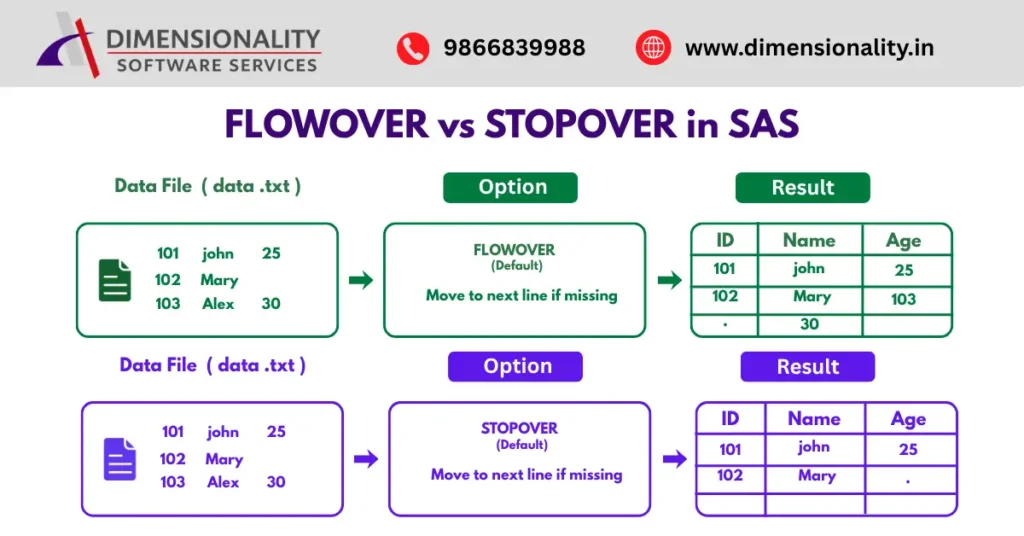
The FLOWOVER option is the default behavior in SAS. It controls how SAS reads records when values are missing.
If SAS cannot find enough values in the current line, it moves to the next line automatically.
Example
- Data test;
- Infile ‘data.txt’ flowover;
- Input id name $ age;
- Run;
Data File
- 101 John 25
- 102 Mary
- 103 Alex 30
Output
| Id | Name | Age |
| 101 | Jhon | 25 |
| 102 | Mary | . |
| 103 | Alex | 30 |
FLOWOVER assigns missing values when data is incomplete.
For additional knowledge about data handling concepts, visit
IBM Data Management Concepts
STOPOVER Option in SAS
The STOPOVER option stops SAS execution when expected values are missing in the current record.
Example
- Data test;
- Infile ‘data.txt’ stopover;
- Input id name $ age;
- Run;
Uses of STOPOVER
- Detects incomplete records
- Useful for data validation
- Prevents incorrect data reading
MISSOVER Option in SAS
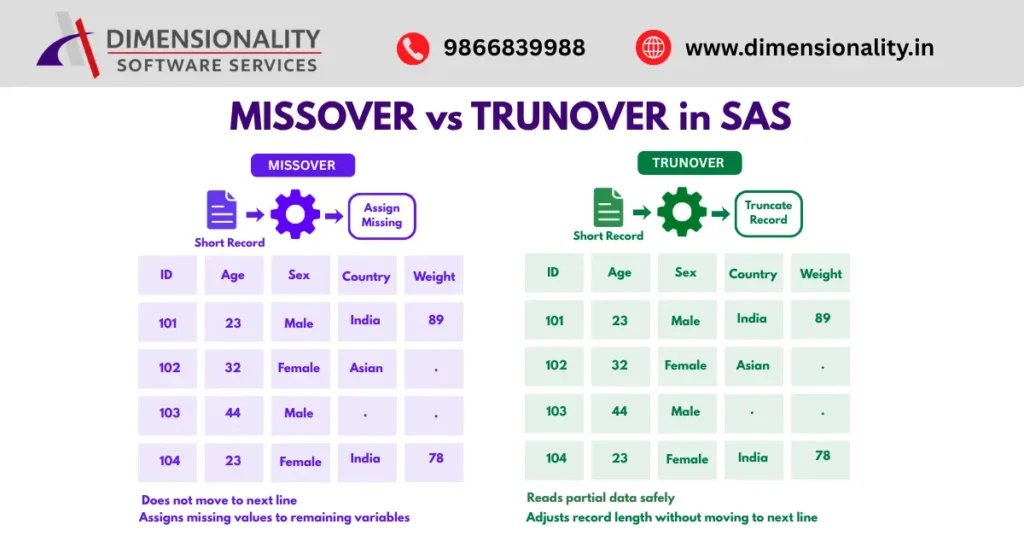
The MISSOVER option tells SAS not to move to the next line if values are missing at the end of a record.
Instead, SAS assigns missing values.
Example
- Data dm;
- Infile cards missover;
- Input subjid age sex $ race $ country $ weight;
- Cards;
- 101 23 male Asian Indian 89
- 102 32 female Asian
- 103 44 male
- 104 23 female Asian Indian 78
- ;
- Run;
Benefits of MISSOVER
- Prevents line shifting problems
- Assigns missing values correctly
- Avoids warnings and errors
MISSOVER is commonly used in real-time clinical data processing.
TRUNCOVER Option in SAS
The TRUNCOVER option is similar to MISSOVER, but it reads partial values instead of moving to the next line.
It adjusts the record length and prevents unwanted data movement.
Advantages of TRUNCOVER
- Reads short records safely
- Useful for fixed-width files
- Prevents data corruption
FIRSTOBS and OBS Options in SAS
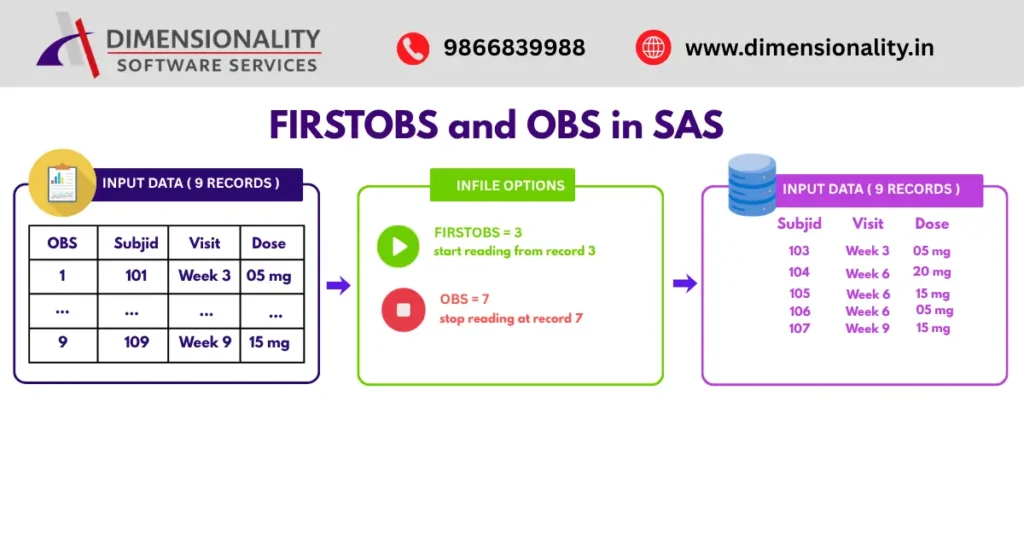
The FIRSTOBS and OBS options are used to read selected records from external files.
Example
- Data mh;
- Infile cards firstobs=3 obs=7;
- Input subjid visit $ dose $;
- Cards;
- 101 week3 05mg
- 102 week3 20mg
- 103 week3 15mg
- 104 week6 20mg
- 105 week6 15mg
- 106 week6 05mg
- 107 week9 10mg
- 108 week9 20mg
- 109 week9 15mg
- ;
- Run;
What FIRSTOBS and OBS Do
- FIRSTOBS=3 → Starts reading from record 3
- OBS=7 → Stops reading at record 7
This method helps programmers read only required records from large datasets.
Freshers interested in Clinical SAS careers can explore
Clinical SAS Jobs for Freshers in India
Reading Text Files Using INFILE Statement
SAS can import text files stored on local systems or servers.
Example
- Data students;
- Infile ‘c:\data\student.txt’ dlm=’&’;
- Input id name $ marks;
- Run;
This example reads data separated by the & delimiter.
Reading TAB Files in SAS
Tab files use tab spaces instead of space/commas. The tab delimiter in SAS is represented as ’09’x.
Example
- Data students;
- Infile ‘c:\data\student_tab.txt’
- dlm=’09’x;
- Input id name $ marks;
- Run;
This method is commonly used for importing Excel-exported text files.
Difference Between DSD and DLM in SAS
| Feature | DSD | DLM |
| Default delimiter | Comma | Custom delimiter |
| Removes quotes | Yes | No |
| Handles missing values | Yes | Limited |
| Used for CSV files | Yes | Sometimes |
| Supports multiple delimiters | No | Yes |
Conclusion
The INFILE statement in SAS is a powerful feature used to read external data files efficiently. Options like DSD, DLM, MISSOVER, FLOWOVER, STOPOVER, TRUNCOVER, FIRSTOBS, and OBS help SAS programmers handle delimiters, missing values, and incomplete records properly.
Understanding these concepts is very important for beginners and professionals working in Clinical SAS, Healthcare Analytics, Banking, and Real-Time Data Processing projects.
By mastering INFILE options, SAS programmers can improve data accuracy, avoid errors, and process external datasets more effectively.