SAS Program Data Vector (PDV): Complete Explanation with Examples
SAS Program Data Vector (PDV): Complete Explanation with Examples
If you are learning SAS programming, Clinical SAS, or SAS DATA step processing, understanding the Program Data Vector (PDV) is one of the most important concepts to master.
The PDV is a temporary logical area created by SAS during DATA step processing. It plays a central role in reading, processing, checking, and writing observations to a SAS dataset.
For students preparing for SAS interviews or learning Clinical SAS Training in Hyderabad, understanding how the Input Stack → Word Scanner → DATA Step Processor → Input Buffer → PDV → SAS Dataset process works can make many DATA step concepts much easier to understand.
In this article, we will explain the SAS Program Data Vector (PDV) step by step, including the Input Stack, Word Scanner, DATA Step Processor, Input Buffer, automatic variables, dataset properties, WHERE vs IF processing, and dataset options.
If you are comparing training options, you can also explore our Best Clinical SAS Training Institutes in Hyderabad with Placements (2026 Guide).
What Is the SAS Program Data Vector (PDV)?
PDV stands for Program Data Vector.
The Program Data Vector is a logical area of memory that SAS creates during the DATA step’s compilation and execution process.
The PDV holds the variables required for the current observation while the DATA step executes.
A simplified view of SAS DATA step processing is:-
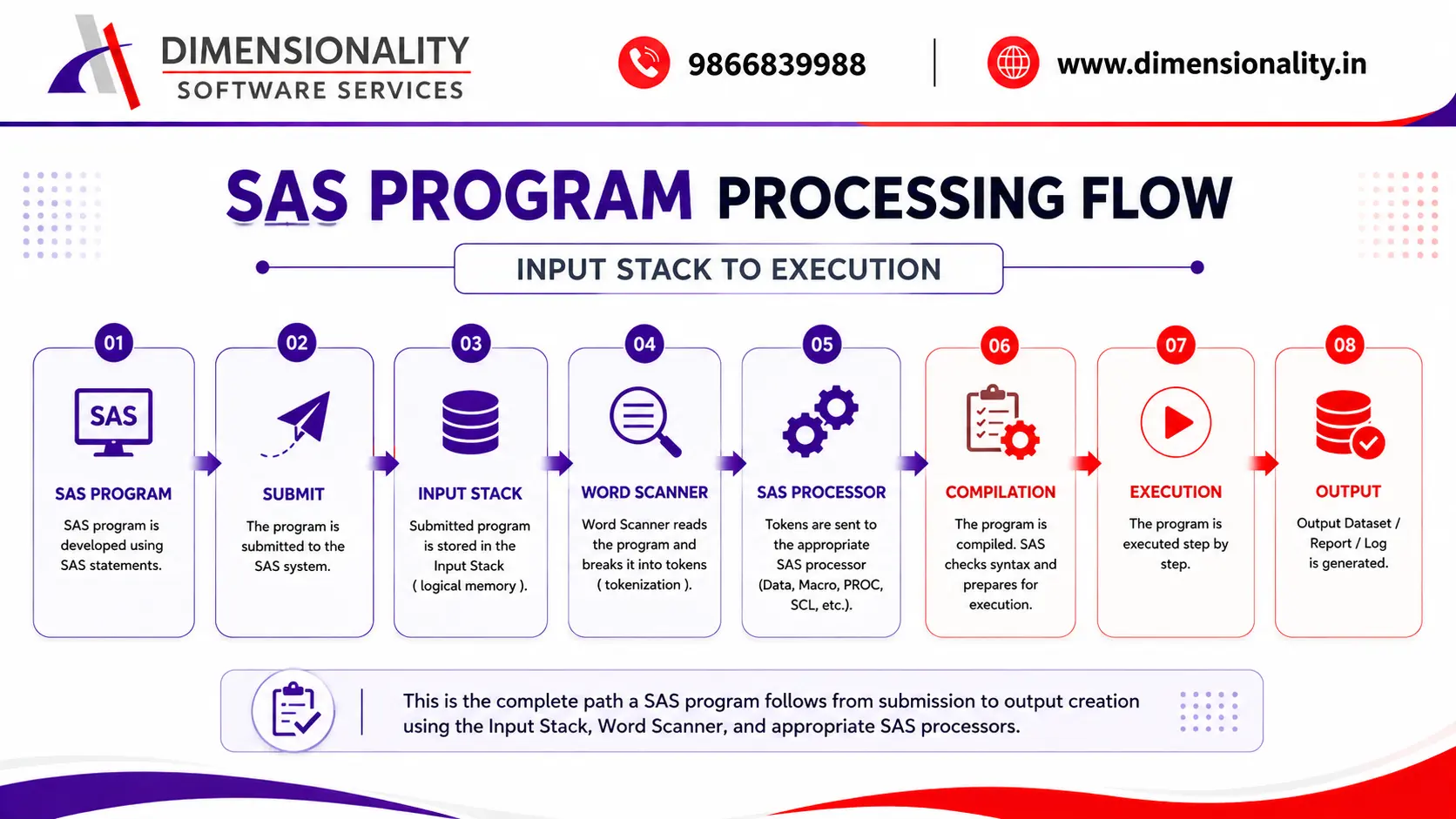
SAS Program → Input Stack → Word Scanner → Appropriate Processor → Compilation → Execution → SAS Dataset
The exact processor used depends on the type of SAS statements in the program.
For example:-
- SAS DATA step statements are handled by the DATA step processor.
- Macro statements and macro triggers are handled by the Macro Processor.
- PROC statements are handled by the appropriate procedure or procedure processor.
- SCL refers to SAS Component Language, a programming language historically used with SAS application development environments such as SAS/AF. It should not be described simply as a language for designing websites.
SAS Program Processing Before Compilation and Execution
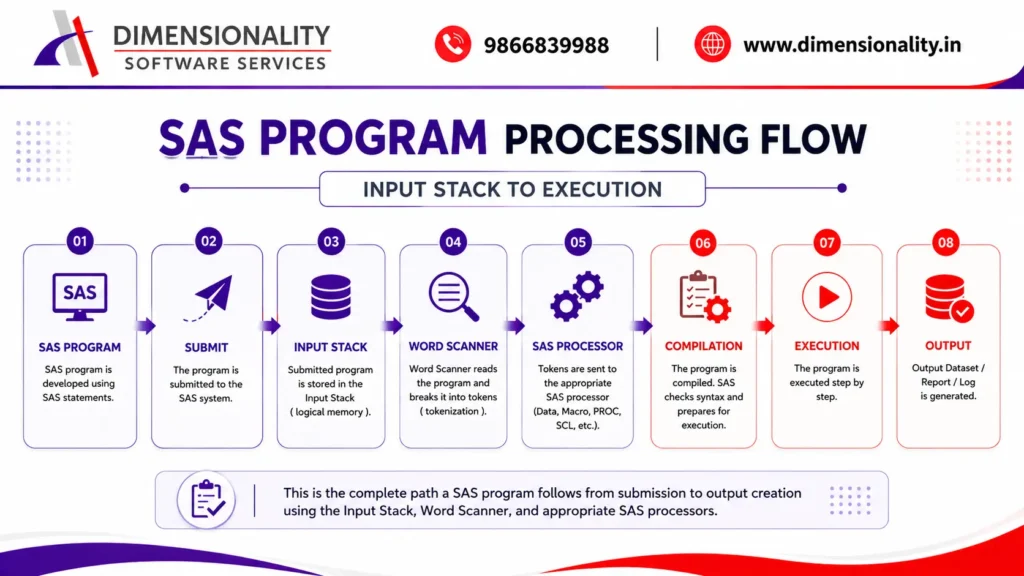
Before SAS begins compiling and executing a DATA step, the submitted program passes through several stages.
A simplified representation is:-
- Develop SAS Application
- Submit the Application
- Input Stack
- Word Scanner
- Appropriate SAS Processor
- Compilation
- Execution
- Output Dataset / Report / Log
The major components involved in this process include the Input Stack, Word Scanner, DATA Step Processor, Macro Processor, and other SAS processing components.
What Is the Input Stack in SAS?
The Input Stack is a logical memory area used by SAS to temporarily hold submitted SAS statements before they are processed.
When you write a SAS program and submit it, SAS receives the program and places the submitted statements into its processing stream.
For example:-
- data demo;
- set sashelp.class;
- run;
After submission, SAS begins scanning and processing the statements.
The Input Stack is therefore part of the process through which SAS receives and prepares submitted statements for further processing.
What Is the Word Scanner in SAS?
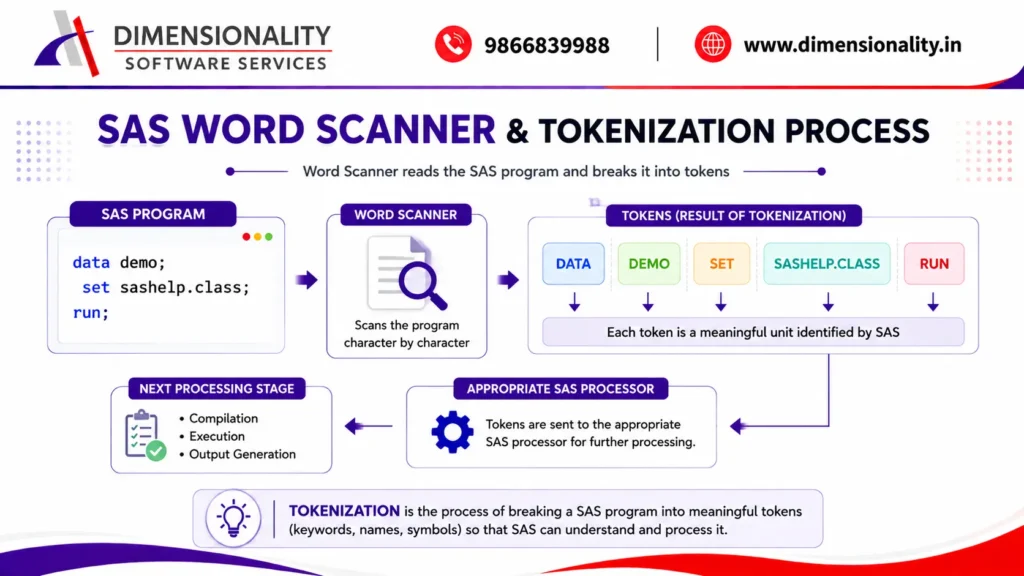
The Word Scanner acts as an important layer during SAS program processing.
It reads the submitted SAS statements and breaks the program into smaller meaningful units called tokens.
This process is commonly referred to as tokenization.
For example:-
- data demo;
- set sashelp.class;
- run;
The SAS word scanner identifies elements such as:-
- DATA
- DEMO
- SET
- SASHELP.CLASS
- RUN
The identified tokens are then made available to the appropriate SAS processor.
What Is a Token?
A token is a meaningful unit recognized by SAS while scanning a program.
Tokens can include:-
- Keywords
- Variable names
- Dataset names
- Operators
- Constants
- Special characters
- Other elements of SAS syntax
The word scanner therefore helps SAS understand the structure of the submitted program before processing it.
DATA Step Processor in SAS
When SAS encounters a DATA step, the DATA step processor handles the DATA step.
For example:-
- data demo;
- set sashelp.class;
- run;
The DATA step processor performs the compilation and execution activities required for the DATA step.
During compilation, SAS determines information such as:-
- Variables
- Variable types
- Variable lengths
- Program statements
- Dataset attributes
- Required PDV structure
During execution, SAS processes observations one at a time.
A simplified flow is:-
- DATA Step
- Compilation
- PDV Creation
- Execution
- Observation Processing
- Output Dataset
What Is the Input Buffer in SAS?
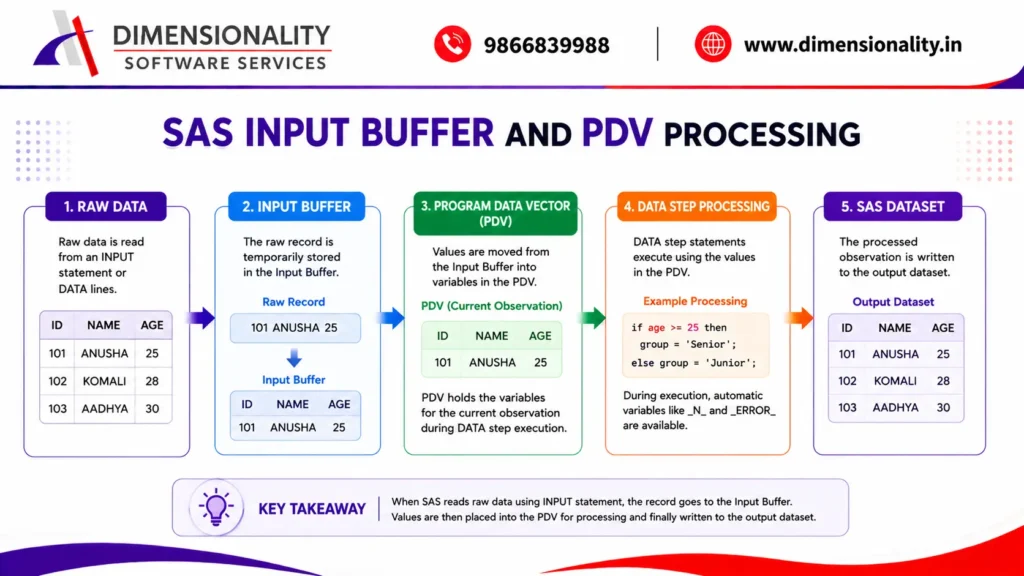
The Input Buffer is a temporary logical memory area used when SAS reads raw data using an INPUT statement.
For example:-
- data demo;
- input id name $ age;
- datalines;
| 101 | ANUSHA | 25 |
| 102 | KOMALI | 28 |
| 103 | AADHYA | 30 |
- ;
- run;
When SAS reads raw data using the INPUT statement, the raw record is first placed into the input buffer.
The values are then read from the input buffer and placed into variables in the PDV.
A simplified flow is:-
- Raw Data
- Input Buffer
- PDV
- Output Dataset
It is important to understand that the input buffer is primarily associated with reading raw data. When a SAS dataset is read using a statement such as SET, SAS does not use the input buffer in the same way as a raw-data INPUT statement.
What Is the Program Data Vector (PDV)?
The Program Data Vector (PDV) is one of the most important concepts in SAS DATA step processing.
During DATA step compilation, SAS creates the PDV.
The PDV contains the variables needed to process the current observation.
For example:-
- data demo;
- set sashelp.class;
- run;
Suppose the input dataset contains:-
- Name
- Sex
- Age
- Height
- Weight
SAS creates the corresponding variables in the PDV and processes the observations one at a time.
Conceptually:-
Observation 1 → PDV → Output
Observation 2 → PDV → Output
Observation 3 → PDV → Output
And the process continues until all observations are processed.
PDV and Observation-by-Observation Processing
One of the most important characteristics of SAS DATA step processing is that SAS normally processes observations sequentially.
Consider:-
- data demo;
- set sashelp.class;
- run;
SAS reads an observation, places the values into the PDV, processes the DATA step statements, and writes the observation to the output dataset.
Then SAS moves to the next observation.
Therefore:-
Input Observation → PDV → Process → Output Observation
This cycle continues until the end of the input data is reached.
Automatic Variables in the PDV
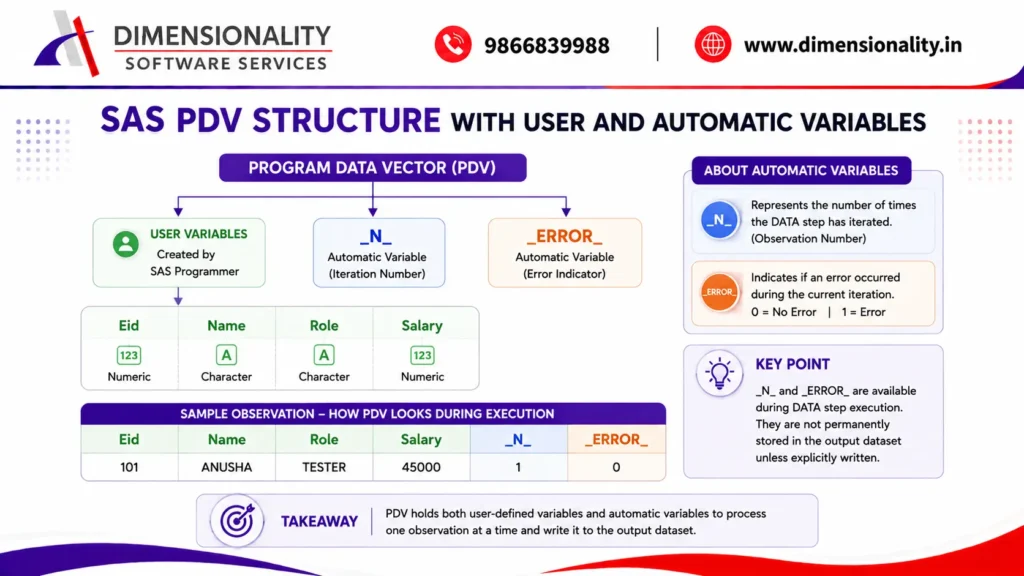
SAS automatically creates certain variables during DATA step processing.
Two particularly important automatic variables are:-
- _N_
- _ERROR_
These variables are automatically available during DATA step execution.
They are not normally written to the output dataset unless explicitly handled.
_N_ Automatic Variable
The _N_ variable represents the number of times the DATA step has iterated.
For example:-
- data demo;
- set sashelp.class;
- run;
If SAS processes five observations, _N_ takes values conceptually like:-
| Iteration | _N_ |
| First iteration | 1 |
| Second iteration | 2 |
| Third iteration | 3 |
| Fourth iteration | 4 |
| Fifth iteration | 5 |
Therefore, _N_ is useful when you need to identify the current DATA step iteration.
Example
- data demo;
- set sashelp.class;
- .
- if _N_ in (2,5);
- run;
This selects observations processed during the 2nd and 5th DATA step iterations.
_ERROR_ Automatic Variable
The _ERROR_ variable indicates whether SAS encountered an error during the processing of the current DATA step iteration.
It generally has two values:-
- 0 – No error
- 1 – An error has occurred
For example:-
- data demo;
- set sashelp.class;
- run;
If no relevant DATA step error occurs during an iteration, _ERROR_ remains 0.
If SAS encounters an error while processing an observation, _ERROR_ can become 1.
The value of _ERROR_ is particularly useful when debugging DATA step programs.
Important Difference Between _N_ and _ERROR_
| Automatic Variable | Purpose |
| _N_ | Indicates DATA step iteration number |
| _ERROR_ | Indicates whether an error occurred during the current iteration |
Both are automatically available in the DATA step.
Dataset Properties or Descriptive Information
When SAS creates a dataset, the dataset also contains descriptive information, commonly called descriptor information.
Descriptor information includes details such as:-
- Dataset name
- Number of observations
- Number of variables
- Variable names
- Variable types
- Variable lengths
- Formats
- Labels
- Informats
- Other dataset attributes
You can examine this information using the CONTENTS procedure.
Example
- proc contents data=sashelp.class;
- run;
This displays important information about the dataset.
Types of SAS Variables
SAS variables can broadly be discussed as user-defined variables and system-generated automatic variables.
User-Defined Variables
These are variables created or used by the SAS programmer.
They can be:-
- Numeric
- Character
Example:-
- data employee;
- input eid name $ role $ salary;
- datalines;
| 101 | ANUSHA | TESTER | 30000 |
| 102 | KOMALI | HR | 35000 |
| 103 | AADHYA | MANAGER | 50000 |
- ;
- run;
Here, eid, name, role, and salary are user-defined variables.
Automatic Variables
SAS automatically creates certain variables during DATA step processing.
Examples include:-
- _N_
- _ERROR_
There are also automatic variable lists such as:-
- _ALL_
- _NUMERIC_
- _CHARACTER_
These are special SAS variable-list references rather than ordinary variables created as dataset columns.
Understanding the Real Structure of SAS Data Processing
Consider the following conceptual example:-
| Eid | Name | Role | _N_ | _ERROR_ |
| 101 | ANUSHA | TESTER | 1 | 0 |
| 102 | KOMALI | HR | 2 | 0 |
| 103 | AADHYA | MANAGER | 3 | 0 |
The first three columns are user-defined variables.
_N_ and _ERROR_ are automatic DATA step variables available during execution.
However, _N_ and _ERROR_ are not automatically stored as permanent variables in the output dataset.
This distinction is important when learning the PDV.
WHERE Statement vs IF Statement in SAS
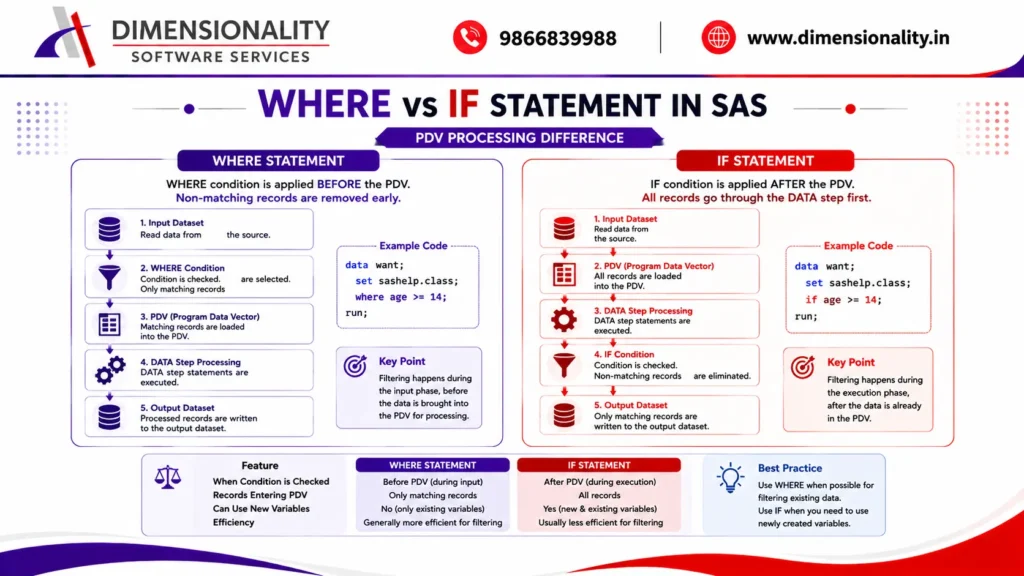
One of the most important practical applications of understanding the PDV is knowing the difference between the WHERE statement and the IF statement.
Both can be used to filter observations, but they operate at different stages.
WHERE Statement
Consider:-
- data dm;
- set sashelp.class;
- where age >= 14;
- run;
When SAS reads observations from an existing SAS dataset, the WHERE condition can be applied during the input phase, before the observation is brought into the PDV for normal DATA step processing.
Conceptually:-
- Input Dataset
- WHERE Condition
- PDV
- DATA Step Processing
- Output Dataset
This can make WHERE filtering more efficient because observations that do not satisfy the condition can be excluded before full DATA step processing.
IF Statement
Now consider:-
- data dm;
- set sashelp.class;
- .
- if age >= 14;
- run;
Here the observation is read into the DATA step and the IF condition is evaluated during DATA step execution.
Conceptually:-
- Input Dataset
- PDV
- IF Condition
- Output Dataset
The important point is that the IF statement is a DATA step execution statement, whereas a WHERE condition can be applied during input dataset processing.
WHERE vs IF: Key Difference
| Feature | WHERE | IF |
| Used for filtering | Yes | Yes |
| DATA step | Yes | Yes |
| PROC steps | Generally supported | Not as a general PROC filtering statement |
| Can filter before PDV for an input SAS dataset | Yes | No |
| Can use newly created DATA step variables | No, if filtering an input dataset before PDV | Yes |
| Usually preferable for simple input filtering | Often | Depends on requirement |
Example
- data dm1;
- set sashelp.class;
- where age >= 14;
- run;
Compared with:-
- data dm2;
- set sashelp.class;
- .
- if age >= 14;
- run;
If the goal is simply to filter an existing dataset using an existing variable, WHERE is often the better choice.
Why Can WHERE Be More Efficient?
Suppose the input dataset contains one million observations, but only 100,000 observations satisfy your condition.
With an input WHERE condition, SAS can eliminate nonmatching observations during input processing rather than carrying every observation through the complete DATA step logic.
This can reduce unnecessary processing.
However, performance depends on the specific program, data source, indexes, conditions, and other factors. Therefore, WHERE should not be described as universally faster in every SAS program.
Reading Part of the Data Using _N_
The _N_ variable can be used to select observations based on DATA step iteration.
Example:-
- data demo;
- set sashelp.class;
- .
- if _N_ in (2,5,10,12);
- run;
Here SAS checks the DATA step iteration number.
The observations processed during iterations 2, 5, 10, and 12 are selected.
Important:-
_N_ is available during DATA step execution.
It is therefore useful for understanding or controlling DATA step iterations.
What Is a WHERE Dataset Option?
A WHERE dataset option allows you to apply a WHERE condition directly to a dataset reference.
For example:-
- proc print data=sashelp.class(where=(sex=”M”));
- run;
The WHERE condition is associated with the dataset being referenced.
Another example:-
- data dm1;
- set sashelp.class(where=(age >= 14));
- run;
This applies the WHERE condition while reading the input dataset.
WHERE Statement vs WHERE Dataset Option
WHERE Statement
- proc print data=sashelp.class;
- where sex=”M”;
- run;
WHERE Dataset Option
- proc print data=sashelp.class(where=(sex=”M”));
- run;
Both can filter the data, but the syntax and placement are different.
The dataset option is attached directly to the dataset reference.
WHERE Dataset Option in a DATA Step
Consider:-
- data dm1;
- set sashelp.class(where=(age >= 14));
- run;
Here the WHERE dataset option is attached to the input dataset.
Conceptually:-
- SASHELP.CLASS
- WHERE Dataset Option
- Matching Observations
- PDV
- Output Dataset
This is an important example of filtering before normal PDV processing.
WHERE Dataset Option on the Output Dataset
A WHERE dataset option can also be associated with an output dataset.
For example:-
- data dm2(where=(age >= 14));
- set sashelp.class;
- run;
Here the WHERE condition is associated with the output dataset.
Conceptually:-
- Input Dataset
- PDV
- DATA Step Processing
- Output WHERE Condition
- Output Dataset
The timing is therefore different from an input dataset WHERE option.
Before-PDV and After-PDV Filtering
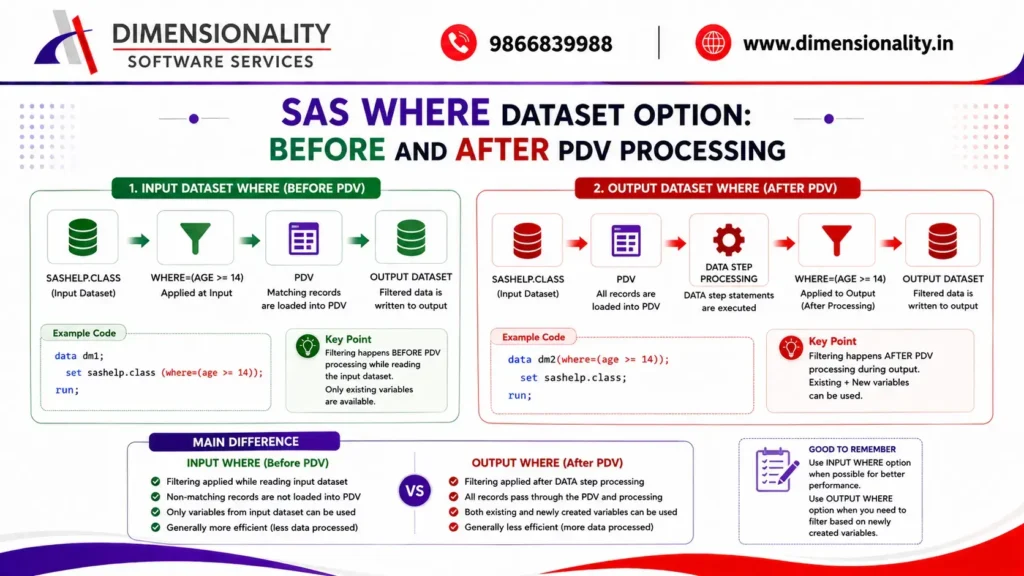
Understanding where a dataset option is applied is important.
Input Dataset Option — Before PDV Processing
- data dm1;
- set sashelp.class(where=(age >= 14));
- run;
The input WHERE condition can filter observations before they are brought into the PDV for normal DATA step processing.
Only variables available in the input dataset can be used in that input WHERE condition.
Output Dataset Option — After DATA Step Processing
- data dm2(where=(age >= 14));
- set sashelp.class;
- run;
Here the output dataset WHERE condition is applied to the observation after DATA step processing.
This distinction becomes especially important when new variables are created.
Example: New Variable and WHERE
Consider:-
- data dm;
- set sashelp.class;
- .
- new_age = age + 1;
- .
- where new_age >= 15;
- run;
This will not work as intended because new_age is a variable created during DATA step execution and is not available to an input WHERE condition applied before PDV processing.
However:-
- data dm;
- set sashelp.class;
- .
- new_age = age + 1;
- .
- if new_age >= 15;
- run;
works because the IF condition is evaluated after new_age has been created in the PDV.
works because the IF condition is evaluated after new_age has been created in the PDV.
This is one of the most important practical differences between WHERE and IF.
KEEP, DROP, RENAME and WHERE Dataset Options
SAS provides several dataset options that can control how datasets are read or written.
Common dataset options include:-
- KEEP=
- DROP=
- RENAME=
- WHERE=
- Other dataset-specific options
Their effect can depend on whether they are attached to an input dataset or an output dataset.
For example:-
- data dm;
- set sashelp.class(keep=name age);
- run;
Here only the selected variables are brought from the input dataset for processing.
Similarly:-
- data dm(drop=age);
- set sashelp.class;
- run;
Here age is excluded from the output dataset.
Understanding the location of the dataset option is therefore essential.
Complete SAS PDV Processing Flow
The complete concept can now be summarized as:-
- SAS Program
- Submit
- Input Stack
- Word Scanner
- Appropriate SAS Processor
- DATA Step Compilation
- PDV Creation
- DATA Step Execution
- Read Observation
- Input Buffer, when raw INPUT processing is involved
- PDV
- DATA Step Statements
- WHERE / IF Processing at the applicable stage
- Data Error Checking
- Output Dataset
During DATA step execution, _N_ and _ERROR_ are available as automatic variables.
Compile Time vs Execution Time
Another important concept in SAS is the difference between compile time and execution time.
Compile Time
During compilation, SAS:-
- Reads and analyzes DATA step statements
- Checks syntax
- Determines variables
- Determines variable attributes
- Builds the PDV
- Prepares the DATA step for execution
Execution Time
During execution, SAS:-
- Reads observations
- Places values into the PDV
- Executes DATA step statements
- Evaluates conditions
- Performs calculations
- Handles errors
- Writes observations to the output dataset
A simple representation is:-
Compile Time
→ Build and prepare the DATA step and PDV
Execution Time
→ Process observations using the compiled DATA step
SAS PDV Example
Consider:-
- data employee;
- input eid name $ role $ salary;
- datalines;
| 101 | ANUSHA | TESTER | 30000 |
| 102 | KOMALI | HR | 35000 |
| 103 | AADHYA | MANAGER | 50000 |
- ;
- run;
During processing, SAS creates the necessary variables in the PDV:-
- eid
- name
- role
- salary
The raw record is read using the INPUT statement, values are placed into the input buffer, and the values are then assigned to the appropriate variables in the PDV.
SAS processes each observation sequentially.
Conceptually:-
Raw Record 1 → Input Buffer → PDV → Output
Raw Record 2 → Input Buffer → PDV → Output
Raw Record 3 → Input Buffer → PDV → Output
Why Is PDV Important in Clinical SAS?
The PDV is especially important for people learning Clinical SAS programming because many DATA step operations depend on understanding how SAS reads and processes observations.
PDV knowledge helps you understand:-
- DATA step execution
- Variable creation
- Automatic variables
- IF conditions
- WHERE conditions
- RETAIN
- FIRST. and LAST. processing
- BY-group processing
- SET and MERGE statements
- Dataset options
- Missing values
- Data validation
- Debugging
- Observation-level processing
For students pursuing Clinical SAS Training in Hyderabad, mastering PDV provides a strong foundation for working with real-world clinical datasets and SAS programming tasks.