Merging Datasets Horizontally in SAS – Complete Beginner Guide with Examples
Merging Datasets Horizontally in SAS – Complete Beginner Guide with Examples
In clinical SAS and real-world data analysis, data is often stored in separate datasets.
For example, one dataset might contain demographic details while another contains information about adverse events.To perform meaningful analysis, these datasets need to be combined into a single dataset.
One of the most common methods to achieve that is horizontal merging.
In this article, you will learn:-
- What Horizontal Merging in SAS is
- Why sorting datasets is essential
- The syntax of the MERGE statement
- The concept of a BY variable
- The different types of merging
- The use of the IN= option
- Practical examples using SAS
- Common mistakes to avoid
- Best practices
Let’s start.
What is Merging in SAS?
Merging is the process of combining two or more SAS datasets into one.
There are two main types of merging in SAS: –
- Horizontal Merging
- Vertical Merging
This article focuses on Horizontal Merging in SAS.
If you’re new to SAS, first read Introduction to SAS Programming for Clinical Studies before learning dataset merging.
What is Horizontal Merging in SAS?
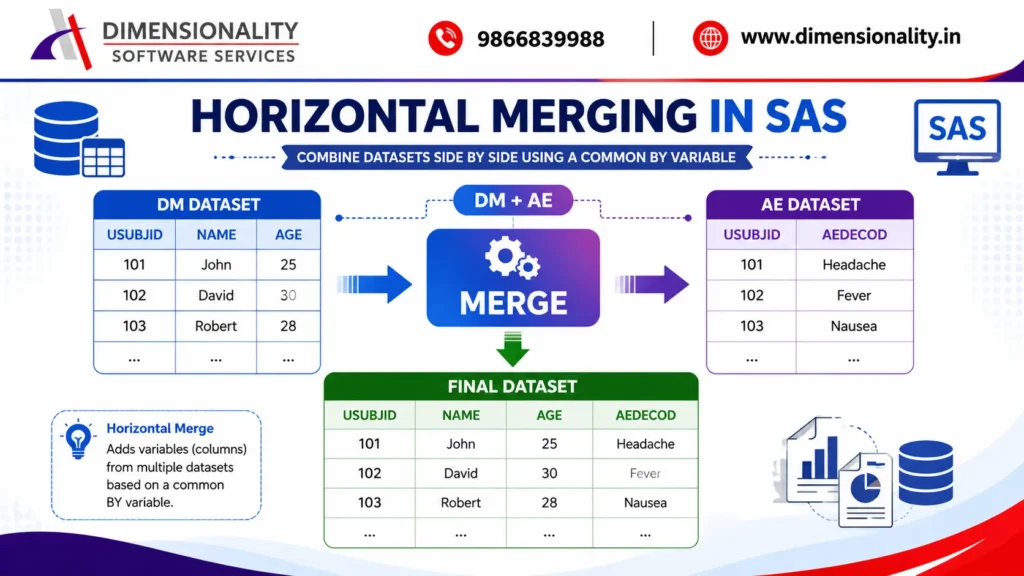
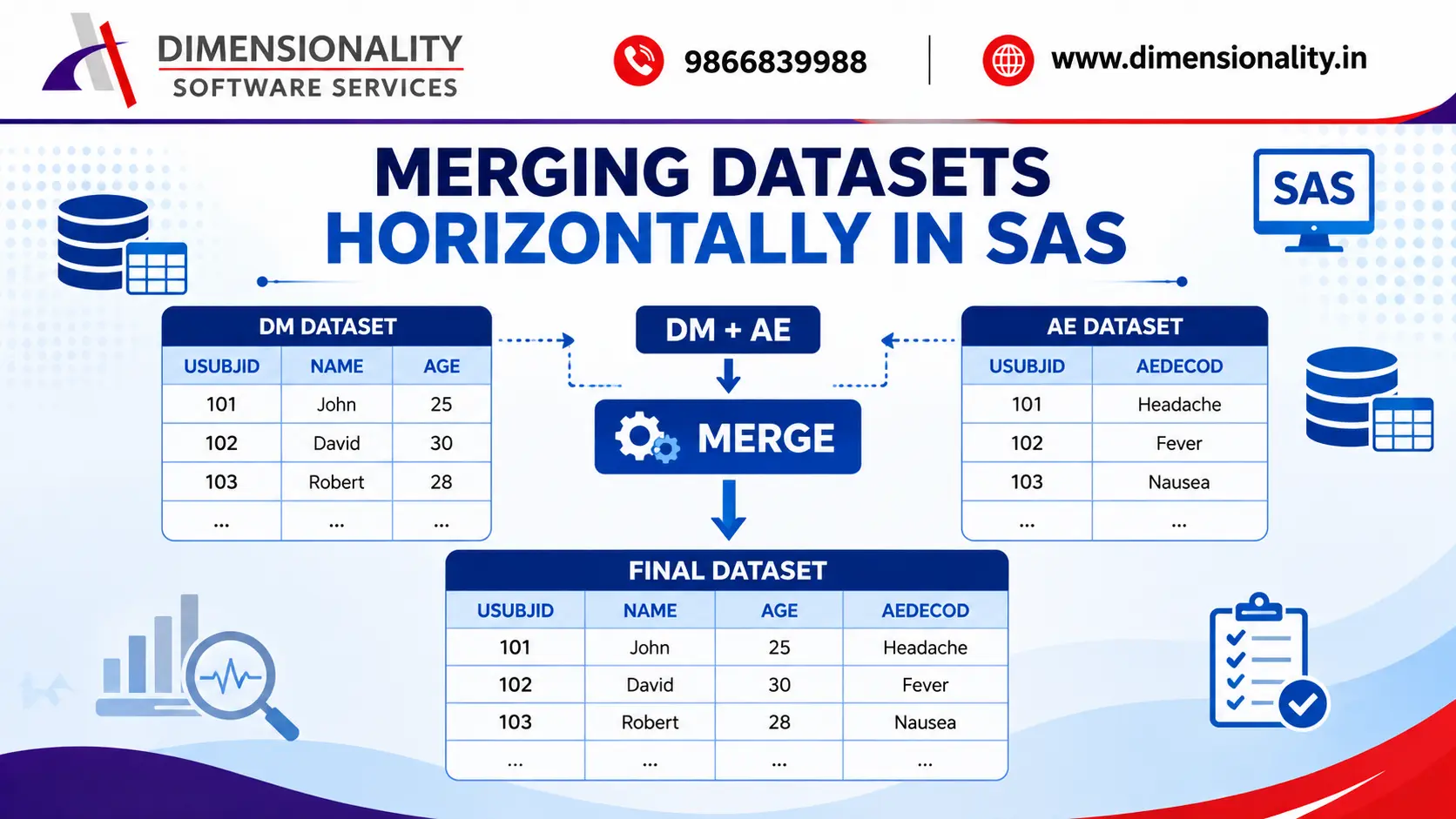
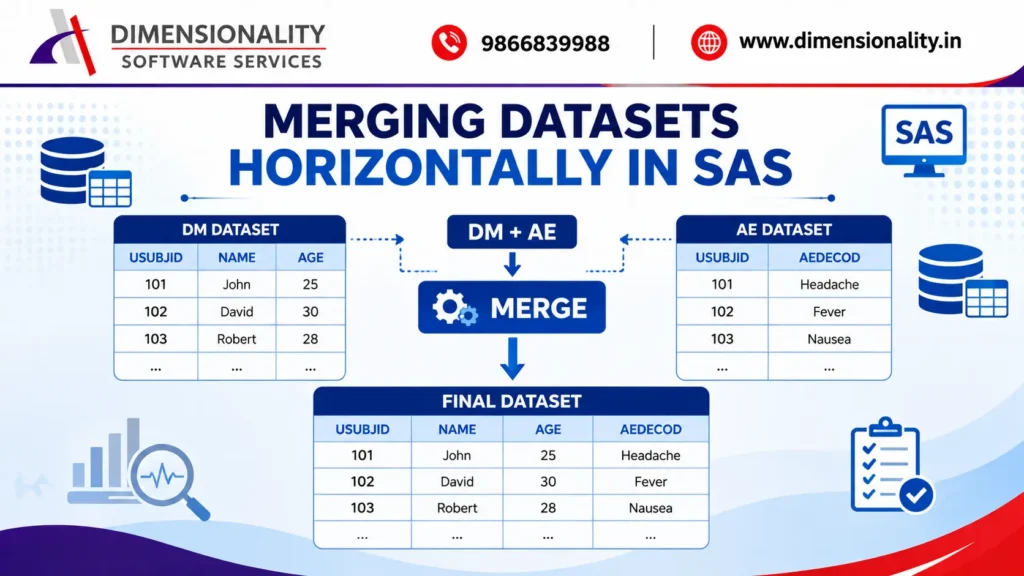
Horizontal Merging is when datasets are combined side by side.
Instead of adding new observations (rows), this method adds new variables (columns).
Dataset 1 (DM)
| USUBJID | Name | Age |
| 101 | John | 25 |
| 102 | David | 30 |
Dataset 2 (AE)
| USUBJID | AEDECOD |
| 101 | Headache |
| 102 | Fever |
After merging,
| USUBJID | Name | Age | AEDECOD |
| 101 | John | 25 | Headache |
| 102 | David | 30 | Fever |
Both datasets are combined using the common variable USUBJID.
Why is Horizontal Merging Important?
Horizontal Merging helps bring together related information usually stored in separate datasets.
Some common uses of this include:-
- Combining Demographics (DM) with Adverse Events (AE)
- Merging Laboratory data with Subject data
- Combining Vital Signs with Demographics
- Creating analysis-ready datasets
- Preparing SDTM and ADaM datasets
- Clinical reporting and statistical analysis
Horizontal merging is frequently used in clinical SAS projects.
Prerequisites for Horizontal Merging
Before merging datasets in SAS, the following must be met.
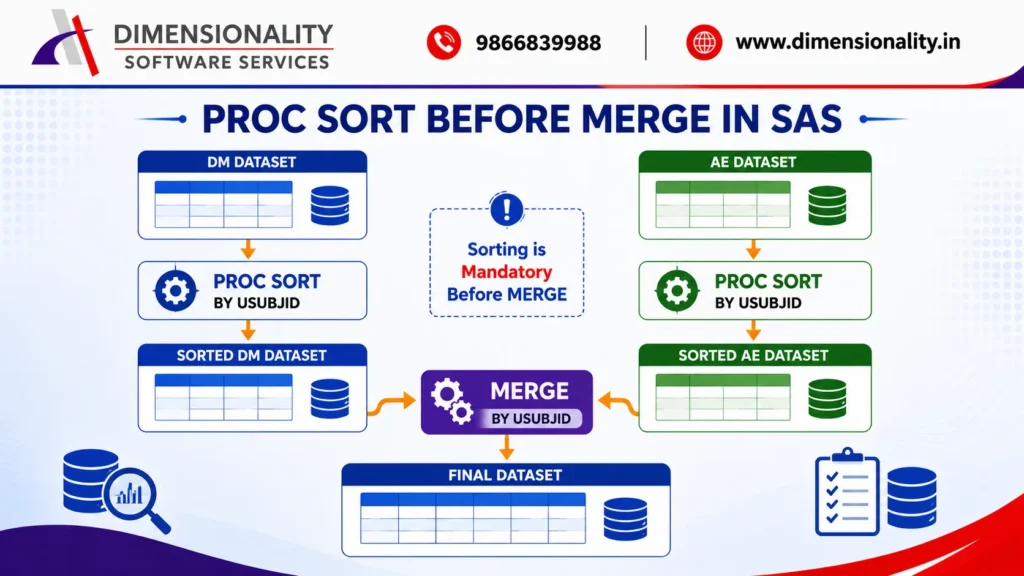
Datasets Must Be Sorted :-
The datasets should be sorted using the same BY variable.
- Example:
- proc sort data=DM;
- by USUBJID;
- run;
- proc sort data=AE;
- by USUBJID;
- run;
Sorting is required because SAS processes observations in sequence during the merge.
Common BY Variable :-
Both datasets need at least one common variable.
- Example: USUBJID
- This variable is referred to as the BY variable.
Without a common BY variable, SAS cannot correctly merge the datasets.
Syntax of Horizontal Merging
- data Final;
- merge Dataset1 Dataset2;
- by Common_Variable;
- run;
Example:-
- data Test;
- merge DM AE;
- by USUBJID;
- run;
Step-by-Step Example
Step 1: Sort the DM Dataset
- proc sort data=DM;
- by USUBJID;
- run;
Step 2: Sort the AE Dataset
- proc sort data=AE;
- by USUBJID;
- run;
Step 3: Merge the Datasets
- data Test;
- merge DM AE;
- by USUBJID;
- run;
The resulting dataset now contains variables from both the DM and AE datasets.
Types of Horizontal Merging in SAS
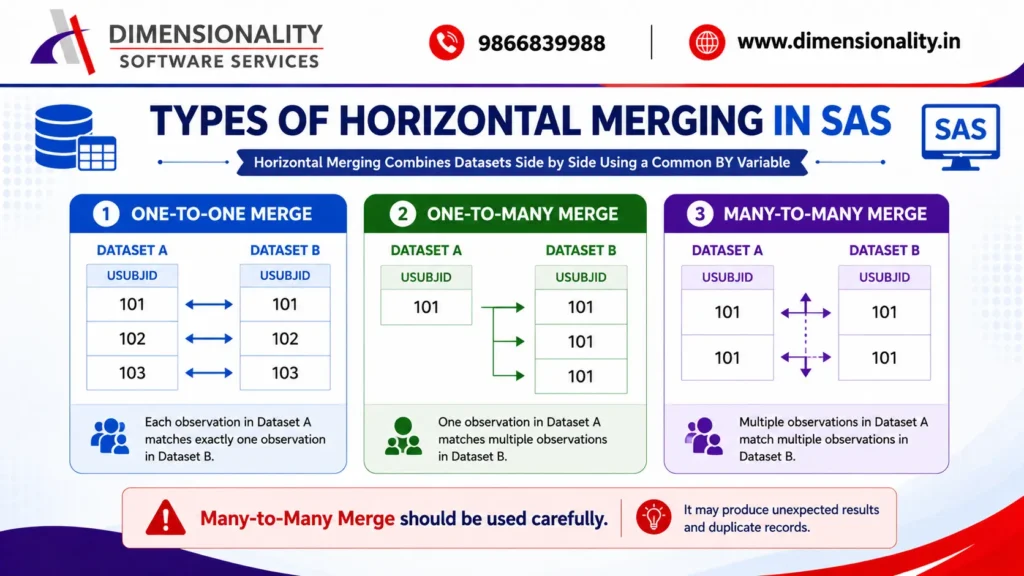
SAS supports three types of horizontal merging.
1. One-to-One Merge
Each observation in Dataset A matches exactly one observation in Dataset B.
Example:-
| DM | AE |
| 101 | 101 |
| 102 | 102 |
| 103 | 103 |
Each subject appears only once.
2. One-to-Many Merge
One observation from the first dataset matches multiple observations from the second dataset.
Example:-
DM Dataset
| USUBJID | Gender |
| 101 | M |
AE Dataset
| USUBJID | Adverse Event |
| 101 | Headache |
| 101 | Fever |
| 101 | Vomiting |
This is the most common type of merge in Clinical SAS.
3. Many-to-Many Merge
Both datasets contain multiple observations for the same BY variable.
Example:-
DM
- USUBJID
- 101
- 101
AE
- USUBJID
- 101
- 101
Many-to-Many merging should generally be avoided because it may produce unexpected results.
Using the IN= Option in SAS Merge
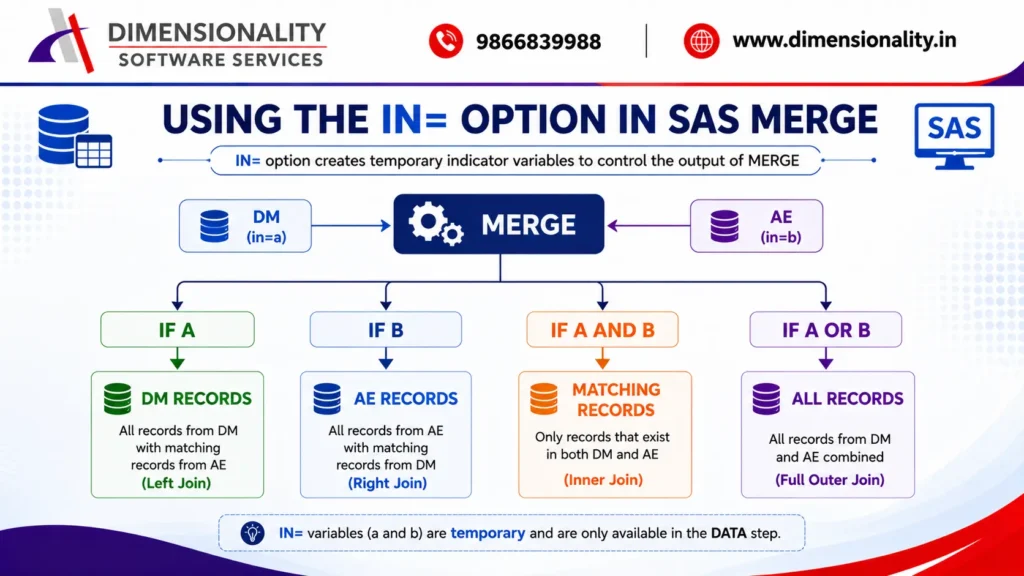
The IN= option creates a temporary variable indicating whether an observation came from a specific dataset.
- Syntax:
- data Test;
- merge DM(in=a)
- AE(in=b);
- by USUBJID;
- run;
The variables a and b are only available during the DATA step.
Example 1: Keep All Records from DM Dataset
- data Test;
- merge DM(in=a)
- AE(in=b);
- by USUBJID;
- if a;
- run;
Output:-
All records from DM
Matching records from AE
Unmatched AE records are ignored
Example 2: Keep All Records from AE Dataset
- data Test;
- merge DM(in=a)
- AE(in=b);
- by USUBJID;
- if b;
- run;
Output:-
All AE records
Matching DM information
Unmatched DM records are excluded
Example 3: Keep Only Matching Records
- data Test;
- merge DM(in=a)
- AE(in=b);
- by USUBJID;
- if a and b;
- run;
Output:-
Only observations that exist in both datasets.
This behaves like an Inner Join.
Example 4: Keep All Records from Both Datasets
- data Test;
- merge DM(in=a)
- AE(in=b);
- by USUBJID;
- if a or b;
- run;
Output:-
All DM observations
All AE observations
Matching records are combined together
This behaves similarly to a Full Outer Join.
Common Mistakes While Merging Datasets
Many beginners make errors when merging datasets.
Here are some common mistakes to avoid: –
- Forgetting to sort datasets before merging
- Using different BY variables in each dataset
- Misspelling the BY variable name
- Assuming SAS automatically sorts datasets
- Using Many-to-Many merges without understanding the output
- Ignoring duplicate BY variable values
- Not checking the merged dataset after execution
Always verify the merged output before using it for analysis.
Best Practices for Horizontal Merging in SAS
Follow these best practices to ensure accurate and efficient dataset merging:-
- Always sort datasets before merging.
- Use the same BY variable in all datasets.
- Verify that the BY variable contains matching values.
- Use the IN= option to control the output dataset.
- Review the SAS Log for merge-related warnings.
- Check for duplicate BY values before merging.
- Validate the final dataset after the merge.
These practices help prevent data inconsistencies and improve code reliability.
If you are planning to build a career in Clinical SAS, you may also like our detailed guide on Best Clinical SAS Training Institutes in Hyderabad with Placements (2026 Guide).
Frequently Asked Questions (FAQs)
- What is Horizontal Merging in SAS?
- Horizontal Merging combines two or more datasets side by side by adding variables using a common BY variable.
- Why is PROC SORT required before MERGE?
- PROC SORT arranges observations based on the BY variable.SAS requires datasets to be sorted before performing a merge.
- What is a BY Variable?
- A BY variable is the common variable that exists in all datasets and is used to match observations during merging.
- Example: USUBJID
- What is the IN= option in SAS?
- The IN= option creates a temporary indicator variable that identifies whether an observation originated from a specific dataset.
- What are the different types of merging in SAS?
- The three primary types are:
- One-to-One Merge
- One-to-Many Merge
- Many-to-Many Merge
Conclusion
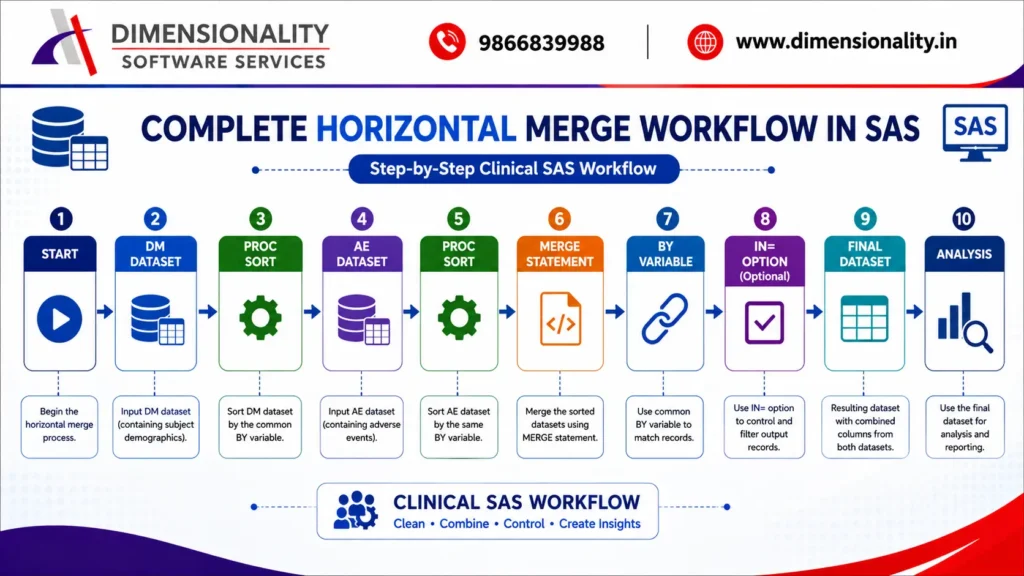
Horizontal merging in SAS is a crucial data manipulation technique used in Clinical SAS, data management, and statistical programming.
By using the MERGE statement, PROC SORT, and the BY variable, you can effectively combine related datasets into a single dataset ready for analysis.
Understanding the IN= option helps you manage which records are included in the final output, allowing you to easily perform left joins, inner joins, and full joins through DATA step merging.
Proficiency in horizontal merging is a vital skill for every SAS programmer. If you are a Pharmacy or Life Science graduate, read our SAS Course for Pharmacy & Life Science Students – Industry-Focused Career Guide (2026) to understand career opportunities in Clinical SAS.